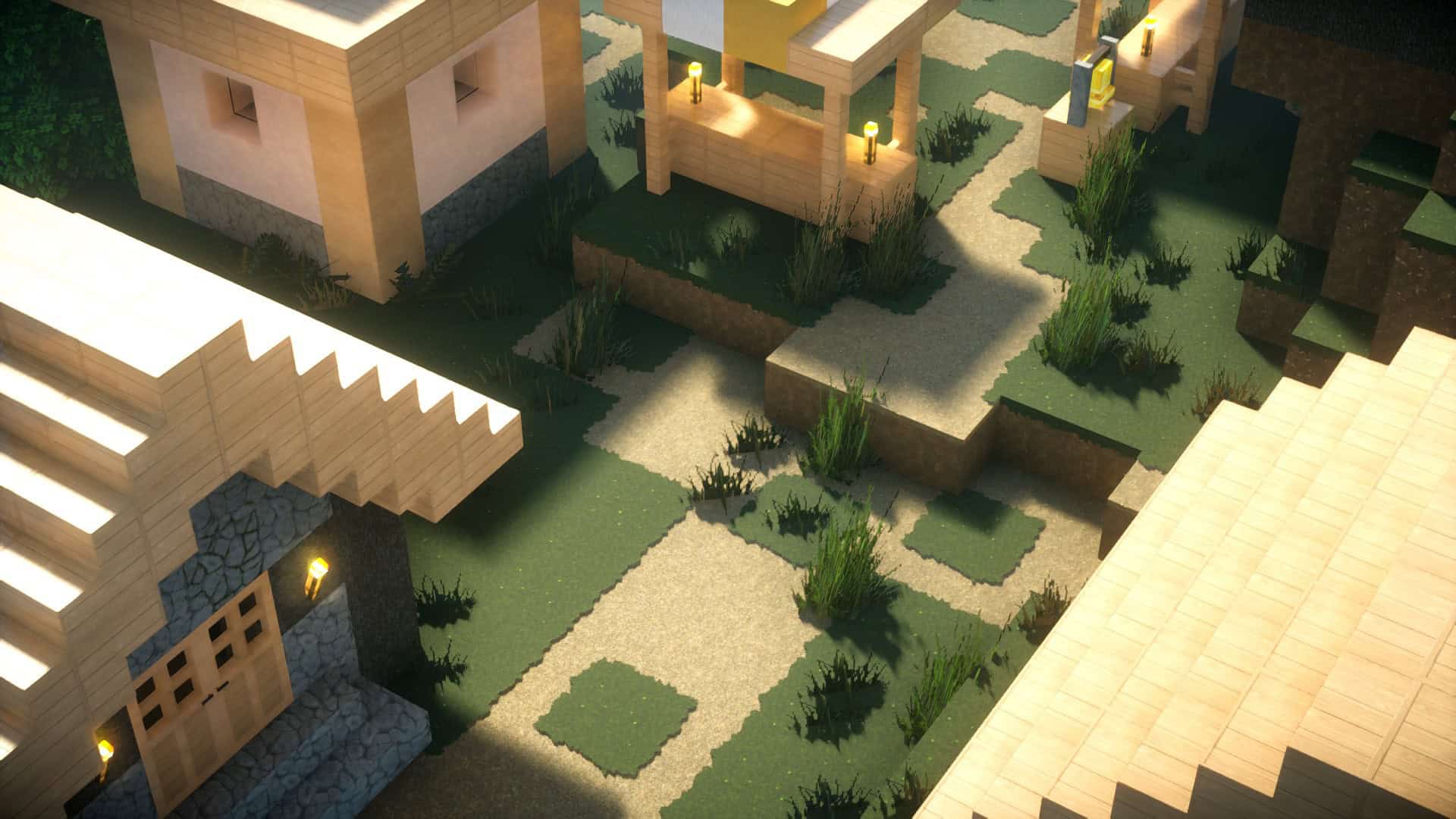
Parallax PBR is an absolute treat of a texture pack that stays completely faithful to the iconic style of vanilla Minecraft while brilliantly enhancing its original qualities. It adds gorgeous details and thoroughly refreshes the game, yet every single item and block remains wonderfully recognizable. The famous Faithful texture pack used to reign supreme when it came to preserving Minecraft’s aesthetics, but incredible new packs are dropping frequently that both honor the original style and add a uniquely distinct touch. The Parallax PBR resource pack is relatively new and was first released on June 25th, 2022. We are thrilled to see it continue receiving steady updates, since its most recent update was posted on January 12th as of us writing this article. Its recent release means it is still climbing the ranks, but the resource pack has already been downloaded over 16 thousand times when we last checked, with 8.5 thousand of those coming straight from CurseForge. The download numbers are rapidly growing, and only time will tell if this texture pack becomes as legendary as those that came before it. The Parallax PBR texture pack is a phenomenal option for anyone wanting to seamlessly combine default and realistic themes into one pack, especially if you are looking for something that includes PBR/POM features. It might genuinely be the best one out there! PBR is an incredible mechanic that makes block textures appear genuinely three-dimensional, while also creating better shadows, reflections, dynamic lighting effects, and so much more. This introduces a breathtaking layer of realism to Minecraft’s graphics while masterfully maintaining the charming blocky appeal of the original textures. There are definitely other resource packs supporting PBR/POM, and many are heavily inspired by Faithful, but Parallax PBR follows this genre with a special twist. It stays true to default textures, but the end results feel far more distinctive and realistic because the creator poured extra creativity into the fine details. This delivers a style close enough to the original to evoke pure nostalgia and familiarity, yet it avoids feeling like a simple one-to-one upscale by mixing in a unique art style that truly elevates the textures. This fresh art style is remarkably clean and tidy, resulting in a simplistically beautiful and realistic world that never overwhelms you with its visuals.
It is delightfully sophisticated, and you can easily check out stunning preview pictures showcasing what to expect on the creator’s Instagram (Msameedc). They even maintain a dedicated Discord server for the Parallax PBR resource pack, which comes in super handy if you ever have any questions or feedback. Ultimately, the Parallax PBR texture pack walks the absolute best line for players who love Minecraft’s default look but crave extra realism, as well as for those who feel Faithful stays just a bit too close to the original. The simplistic and familiar textures suit pretty much any type of world or build you can imagine, though they will especially make modern builds pop. It has a wonderfully broad appeal that will delight nearly everyone who tries it, and players who prefer packs that don’t alter core textures too drastically will fall completely in love with it. We wholeheartedly recommend this pack to everyone looking for a realistic, beautifully simple resource pack that genuinely cares about the little details. Parallax PBR will seriously enhance every single aspect of Minecraft’s visuals, and the high-resolution textures will bring your in-game world to life in a way that feels nothing short of perfect. These stunning graphics upgrade your game without changing too much of the core vibe once you have it running. The creator’s immense effort and time were genuinely well-spent meticulously crafting an immersive and gorgeous world for us to explore. Every single texture in this resource pack is fully PBR compatible, meaning they react to shadows and light with incredible accuracy. Furthermore, amazing 3D models are included right inside Parallax PBR alongside a ton of other fantastic features. Any Minecrafter wanting to push their game’s aesthetic to the next level owes it to themselves to give it a try. It is simply the ideal resource pack for you! Finally, if you love these textures but want something that ventures even further away from the default style, the creator has you completely covered. MSameedC also offers a second texture pack called Parallax Stylized that replaces original textures with fresh designs that lean much heavier into a stylized aesthetic than Parallax PBR. It is a lot like the pack we are talking about here, just much more adventurous with its textures, lighting, and shading!
Parallax PBR should be compatible with all of these Minecraft versions: 1.21.10 – 1.21.9 – 1.21.8 – 1.21.7 – 1.21.6 – 1.21.5 – 1.21.4 – 1.21.3 – 1.21.2 – 1.21.1 – 1.21 – 1.20.6 – 1.20.5 – 1.20.4 – 1.20.3 – 1.20.2 – 1.20.1 – 1.20 – 1.19.4 – 1.19.3 – 1.19.2 – 1.19.1 – 1.19 – 1.18.2 – 1.18.1 – 1.18
Screenshots


How to Install Texture Pack (Simple 10 Steps)
- Download OptiFine: Most of the texture packs and shaders need OptiFine. That’s why, first download and install OptiFine for the version of Minecraft you want to play.
- Download the Texture Pack: Get the texture pack you want from the download section. Choose the version that works with your Minecraft and your PC’s performance.
- Open Minecraft Launcher: Start Minecraft using the official game launcher — or even TLauncher, if you use that.
- Go to Options: From the main menu, click on the “Options” button.
- Open Resource Packs: Inside Options, click on “Resource Packs…”.
- Open the Resource Pack Folder: Click on “Open Resource Pack Folder” — this will open a folder named “resourcepacks”.
- Move the Pack File: Copy or move the .zip file you downloaded into that “resourcepacks” folder. (Don’t unzip the file — Minecraft uses it as-is!)
- Go Back and Refresh: Close the folder and click “Done”, then go back into “Resource Packs…” again.
- Activate the Pack: You’ll see the pack on the left side. Hover over it and click the arrow to move it to the right (active side).
Tip: If you get a message that the pack is for a different version, just click “Yes” — it usually works fine. - Click Done and Enjoy: Click “Done” again. Now your pack is ready to use in-game. It’s that easy!
Credits
Credits: This project was created by MSameedC. We do not own or claim ownership of this content. All rights belong to the original author. We strongly recommend supporting the creator by visiting their official download pages and community channels.
Download Links
Java Edition
Download Instructions
Curseforge: download starts automatically after a few seconds;
Mediafire: click the big blue button with the text “DOWNLOAD”;
Google Drive: in the top right corner you will see a small download icon (down arrow), click it and the download should start;


