Minecraft Texture Packs Minecraft Resource Packs

Introduction
Armor trims added a new layer of customization to Minecraft, but mixing trims with different armor textures can quickly lead to visual inconsistencies. Armor Trim Compat Texture Pack is designed to solve exactly that problem. Instead of changing how armor looks, this pack focuses on making armor trims display correctly and consistently across supported texture packs and vanilla assets. The result is a cleaner, more reliable visual experience where trims look intentional rather than patched on.
This texture pack is not about flashy redesigns or artistic overhauls. Its purpose is precision. It ensures that armor trims integrate smoothly with existing armor textures, preserving the original style while fixing compatibility gaps that can otherwise break immersion.
What Armor Trim Compat Texture Pack Is
Armor Trim Compat Texture Pack is a compatibility-focused resource pack built to improve how armor trims render in Minecraft. Its core goal is to make trims align properly with armor textures, avoiding visual glitches, mismatched colors, or trim elements that feel out of place. Rather than reinventing armor visuals, the pack works quietly in the background, ensuring trims behave as intended.
Compared to full armor retexture packs, this one is far more specialized. It does not replace armor designs or introduce a new art style. Instead, it acts as a bridge between vanilla armor trims and other texture packs that may not fully support them out of the box. This makes it especially useful for players who enjoy experimenting with multiple packs while still wanting trims to look correct.
Armor Trim Compat Texture Pack is compatible with the following Minecraft versions: 1.20.x – 1.21.x (and newer minor updates that retain the armor trim system).
The pack uses a 16x resolution, keeping everything fully vanilla-friendly and lightweight. OptiFine is not required, though it can be used alongside the pack without issues if already part of your setup.
Art Style, Visual Direction, and Gameplay Clarity
The visual direction of Armor Trim Compat Texture Pack is intentionally restrained. It follows a strictly vanilla-compatible approach, ensuring that trims feel like a natural extension of Minecraft’s default design language. Colors, shading, and trim placement closely match Mojang’s original intent, avoiding unnecessary embellishments or stylistic shifts.
Because the pack does not alter base armor textures, it preserves the familiar look of iron, diamond, netherite, and other armor types. What it improves is how trims sit on top of those textures. Edges appear cleaner, trim patterns are better aligned, and color contrast feels more balanced across different armor materials. This is especially noticeable when using multiple trim materials, where mismatched highlights can otherwise stand out.
From a gameplay clarity standpoint, the pack excels at subtle consistency. Armor pieces remain easy to recognize at a glance, and trim patterns stay readable without overwhelming the base armor design. This is important in both survival and multiplayer environments, where quick visual identification matters. The pack ensures that trims enhance customization without reducing clarity or introducing visual noise.
Perfect For Players Who
- Use armor trims frequently and want them to look consistent
- Combine multiple texture packs and need better trim compatibility
- Prefer a vanilla-friendly visual style with minimal changes
- Value clean visuals over dramatic retextures
- Want a lightweight pack that does not affect performance
Screenshots Section
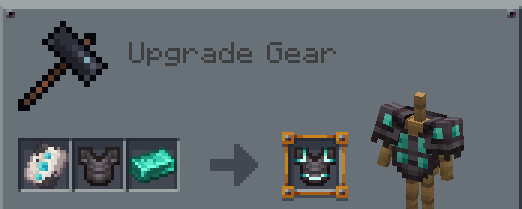
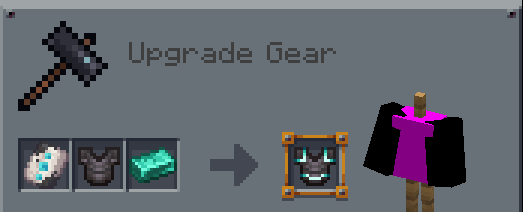
The screenshots provided are taken from official sources and showcase the texture pack running in-game. They highlight how armor trims appear across different armor types and materials, demonstrating the pack’s focus on consistency and alignment. These images give a clear idea of how the pack integrates seamlessly with vanilla visuals and supported texture packs.
Download
You can download the texture pack using the official link below.
This texture pack is created by the original Armor Trim Compat creator, and full credit goes entirely to the original author for their work and continued updates.
Disclaimer
We do not host texture pack files. We only provide links to official sources, and availability of external links may change over time.