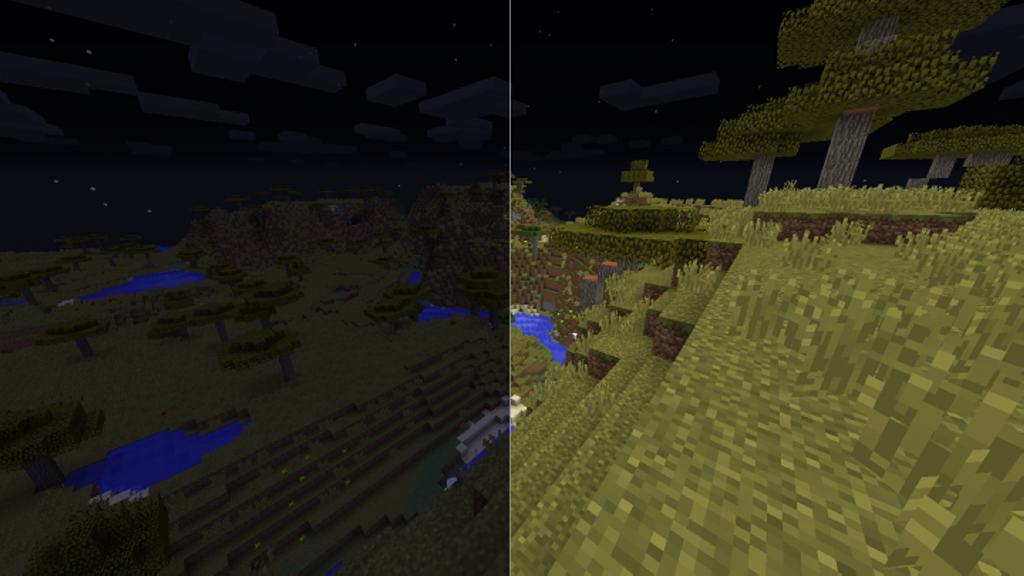
While most texture packs tend to focus purely on fancy visuals, I found that the Nightly resource pack is actually much more about pure functionality and utility. Instead of totally altering the game’s textures or introducing brand new blocks and items, this resource pack makes one single, incredibly significant change, and that is how lighting works during the night time. It was made solely for added clarity and as a brilliant means to improve gameplay during those times when the game deliberately wants to give you difficulties seeing objects, blocks, mobs, or other players. I think it is the ideal resource pack for players who want to thoroughly enjoy the classic vanilla Minecraft experience but simply dislike playing during the pitch-black nighttime. According to the developer, using the Nightly texture pack feels just like having infinite night vision potions active. It achieves this neat trick by cleverly changing the colormap and lightmap of the world, which are the two parameters used to control the day cycle in the game. As the developer states, the resource pack alters the color filter that determines light levels during the night alongside the darkness of the shadows. The final result is a much brighter game with beautifully toned-down shadows that make it so much easier to see clearly during the night. Some players might refer to this resource pack as a simple brightness and gamma adjustment mod, but I noticed it does much more than that, and best of all, it is completely safe and not bannable.
Why would you actually need such a resource pack in your game? The answer is pretty simple: it gives you a fantastic edge in PVP since you can spot enemy players much easier. I also found it immensely helpful when fighting aggressive mobs during the night and exploring the vast world even long after sundown. On top of that, the Nightly resource pack dramatically improves overall visibility inside dark buildings and gloomy caves. Another great reason for using the Nightly resource pack is if you happen to have a lower-quality monitor. Some monitors feature low luminosity and tend to display colors way darker than normal, but with this resource pack installed, Minecraft becomes infinitely more enjoyable to play during nighttime hours. Because the resource pack does not contain any considerable texture changes, it completely avoids affecting your game performance. Minecraft continues to use the standard 16x resolution textures with the resource pack active, meaning any computer that can comfortably run vanilla Minecraft will be able to run it with the Nightly resource pack just as smoothly. To get the resource pack working properly, Optifine is required. You can install the resource pack on virtually any version of Minecraft and any version of Optifine, with the only exception being Minecraft: Windows 10 Edition, as it will only work with the Java Edition and Optifine. As a final note from the developer, the Nightly resource pack does not work together with any custom shaders because the resource pack handles all lighting calculations entirely on its own.
Nightly should be compatible with all of these Minecraft versions: 1.21.11 – 1.21.10 – 1.21.9 – 1.21.8 – 1.21.7 – 1.21.6 – 1.21.5 – 1.21.4 – 1.21.3 – 1.21.2 – 1.21.1 – 1.21 – 1.20.6 – 1.20.5 – 1.20.4 – 1.20.3 – 1.20.2 – 1.20.1 – 1.20 – 1.19.4 – 1.19.3 – 1.19.2 – 1.19.1 – 1.19 – 1.18.2 – 1.18.1 – 1.18 – 1.17.1 – 1.17 – 1.16.5 – 1.16.4 – 1.16.3 – 1.16.2 – 1.16.1 – 1.16 – 1.15.2 – 1.15.1 – 1.15 – 1.14.4 – 1.14.3 – 1.14.2 – 1.14 – 1.13.2 – 1.13.1 – 1.13 – 1.12.2 – 1.12 – 1.11.2 – 1.11 – 1.10.2 – 1.10 – 1.9.4 – 1.9 – 1.8.9 – 1.8.8 – 1.8.1 – 1.8.6 – 1.8
Screenshots
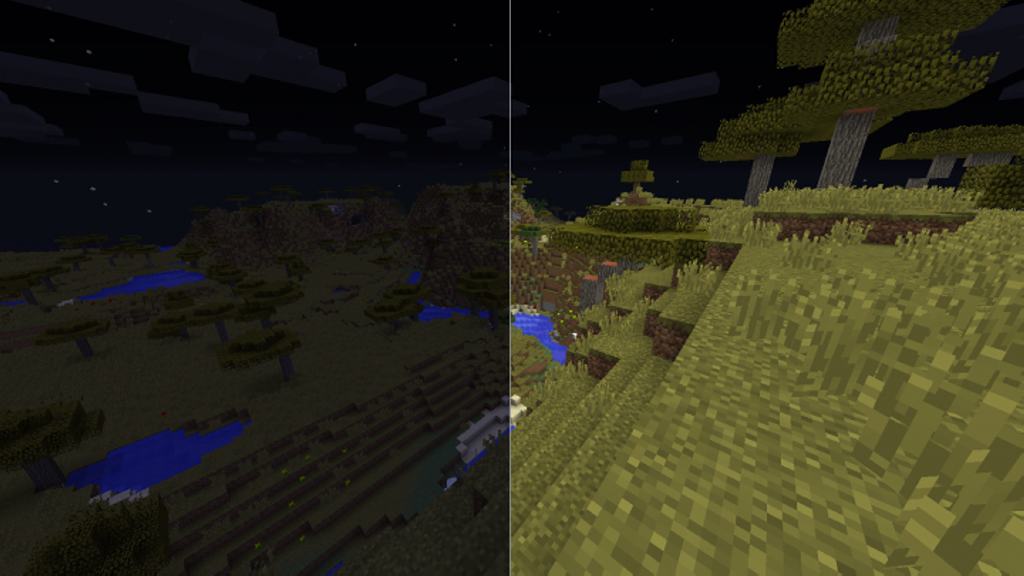
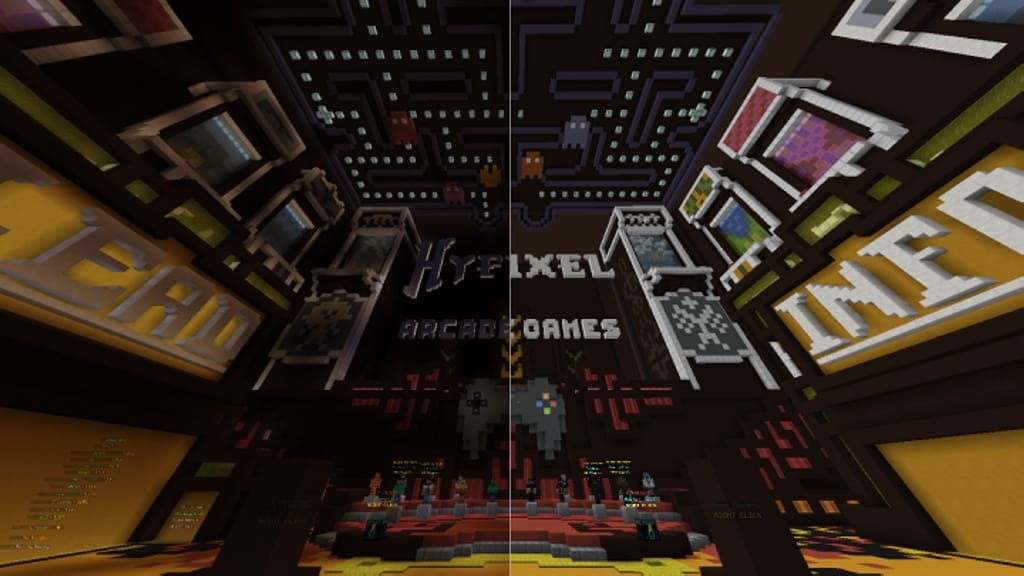
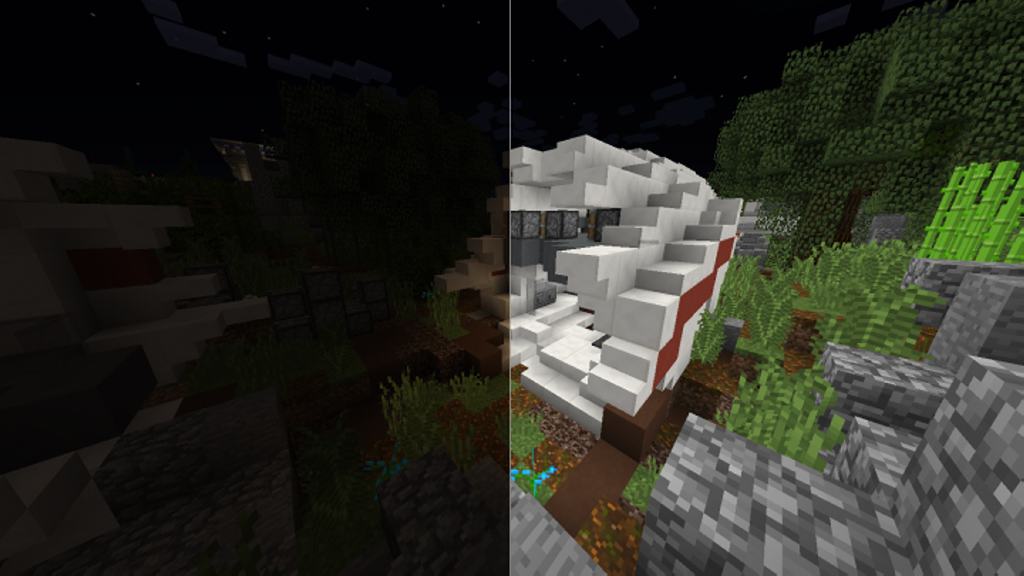
How to Install Texture Pack (Simple 10 Steps)
- Download OptiFine: Most of the texture packs and shaders need OptiFine. That’s why, first download and install OptiFine for the version of Minecraft you want to play.
- Download the Texture Pack: Get the texture pack you want from the download section. Choose the version that works with your Minecraft and your PC’s performance.
- Open Minecraft Launcher: Start Minecraft using the official game launcher — or even TLauncher, if you use that.
- Go to Options: From the main menu, click on the “Options” button.
- Open Resource Packs: Inside Options, click on “Resource Packs…”.
- Open the Resource Pack Folder: Click on “Open Resource Pack Folder” — this will open a folder named “resourcepacks”.
- Move the Pack File: Copy or move the .zip file you downloaded into that “resourcepacks” folder. (Don’t unzip the file — Minecraft uses it as-is!)
- Go Back and Refresh: Close the folder and click “Done”, then go back into “Resource Packs…” again.
- Activate the Pack: You’ll see the pack on the left side. Hover over it and click the arrow to move it to the right (active side).
Tip: If you get a message that the pack is for a different version, just click “Yes” — it usually works fine. - Click Done and Enjoy: Click “Done” again. Now your pack is ready to use in-game. It’s that easy!
Credits
The Nightly resource pack was created by moxwel. We do not claim ownership of this content, nor have we modified the original files. All rights and credits belong entirely to the original creator. We strongly encourage you to support moxwel by downloading the content from the official sources.
Download Instructions
Curseforge: download starts automatically after a few seconds;
Mediafire: click the big blue button with the text “DOWNLOAD”;
Google Drive: in the top right corner you will see a small download icon (down arrow), click it and the download should start;