Minecraft Texture Packs Minecraft Resource Packs

Fire is one of Minecraft’s most dramatic visual effects, but it can also be one of the most distracting. When your player catches fire, the default flame overlay takes up a large portion of the screen, often blocking visibility at the exact moment you need clarity the most. The Low On Fire Texture Pack is designed to solve that problem in a clean and focused way. Instead of changing the entire visual style of the game, it makes one smart adjustment that improves gameplay comfort without altering Minecraft’s core look.
This pack is small, purposeful, and easy to understand, making it popular among players who want better visibility while fighting mobs, exploring lava-heavy areas, or playing competitively. It does not aim to be flashy or artistic. Its goal is practical improvement, and it delivers exactly that.
What Low On Fire Texture Pack Is
Low On Fire Texture Pack is a utility-focused resource pack that lowers the height of the fire overlay when the player is burning. In vanilla Minecraft, fire can rise high enough to block the center of the screen, which can be frustrating during combat, parkour, or fast-paced gameplay. This pack reduces that visual obstruction while keeping the fire effect clearly visible.
Unlike full PvP packs or visual overhauls, Low On Fire does not retexture blocks, items, or the environment. It focuses only on the fire animation seen in first-person view. This makes it lightweight, easy to combine with other texture packs, and suitable for almost any playstyle.
Low On Fire Texture Pack is compatible with the following Minecraft versions: 1.8.x – 1.20.x (and newer updates when supported).
The pack uses a 16x resolution, matching vanilla Minecraft perfectly. OptiFine is not required, as the pack works in standard Minecraft without additional mods.
Art Style, Visual Direction, and Gameplay Clarity
The visual direction of Low On Fire Texture Pack is strictly vanilla-friendly. The fire texture itself is not redesigned with new colors or effects. Instead, the pack adjusts how much of the fire appears on-screen. The flames sit lower, leaving more of the center view clear while still communicating that the player is on fire.
This subtle change has a noticeable impact on gameplay clarity. During combat, players can track enemies more easily. While navigating lava caves or the Nether, visibility improves without removing immersion. The fire still feels dangerous, but it no longer feels intrusive.
Because the pack does not modify UI elements, blocks, or items, it preserves Minecraft’s original visual consistency. This makes it ideal for players who already use shader packs, PvP packs, or vanilla-plus textures. Low On Fire works as a layer of improvement rather than a replacement, enhancing readability without drawing attention to itself.
Perfect For Players Who
- Want clearer visibility while on fire
- Play PvP, hardcore, or survival modes
- Prefer minimal, utility-based texture packs
- Use other resource packs and want full compatibility
- Like vanilla visuals but smoother gameplay experience
Screenshots Section
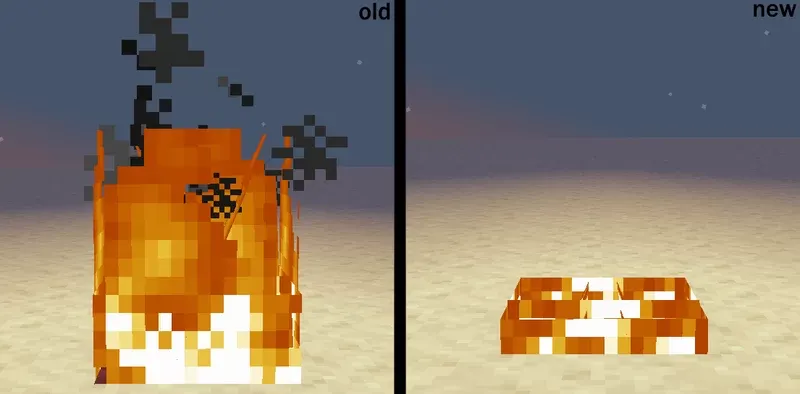
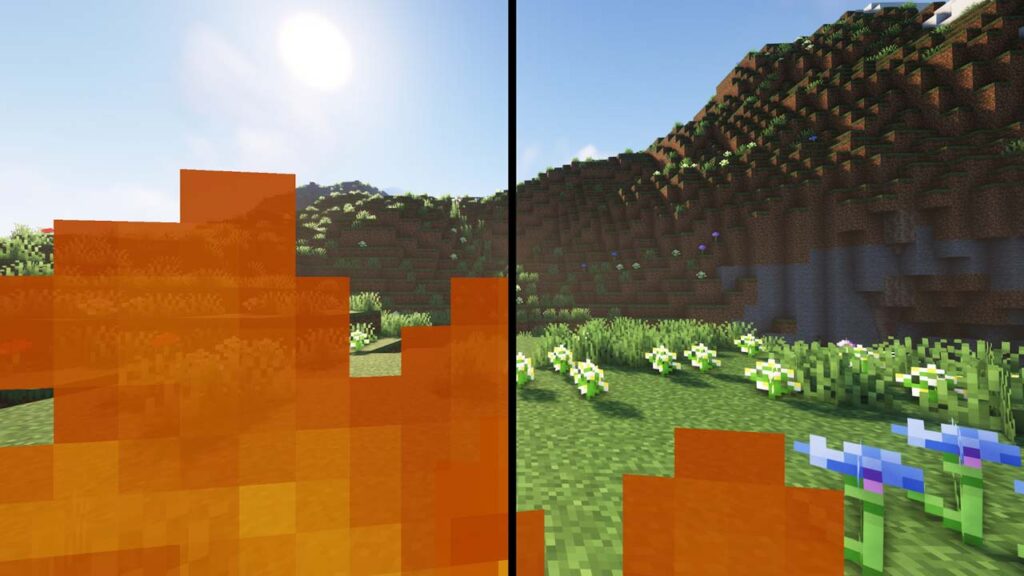
The screenshots provided for Low On Fire Texture Pack are taken from official sources and show the pack running in-game. They highlight how the lowered fire overlay improves screen visibility while still keeping the burning effect intact. These images clearly demonstrate the difference compared to vanilla fire without relying on exaggerated comparisons.
Download
You can download the texture pack using the official link below.
Bedrock Edition:
Download Low Fire Resource Pack for Bedrock Edition – by TheCubicCompany
Java Edition:
[16x] [1.21.x] Download Low On Fire Resource Pack
[16x] [1.20.x] Download Low On Fire Resource Pack
[16x] [1.19.x] Download Low On Fire Resource Pack
[16x] [1.18.x] Download Low On Fire Resource Pack
[16x] [1.17.x] Download Low On Fire Resource Pack
[16x] [1.16.x – 1.15.x] Download Low On Fire Resource Pack
[16x] [1.14.x – 1.13.x] Download Low On Fire Resource Pack
[16x] [1.12.x – 1.11.x] Download Low On Fire Resource Pack
[16x] [1.10.x – 1.9.x] Download Low On Fire Resource Pack
[16x] [1.8.x – 1.6.x] Download Low On Fire Resource Pack
Curseforge: download starts automatically after a few seconds;
Mediafire: click the big blue button with the text “DOWNLOAD”;
Google Drive: in the top right corner you will see a small download icon (down arrow), click it and the download should start;
Creator: Low On Fire Texture Pack Creator
All credit for this texture pack goes to the original creator.
Disclaimer
Disclaimer:
We do not host texture pack files. We only provide links to official sources, and availability of external links may change over time.