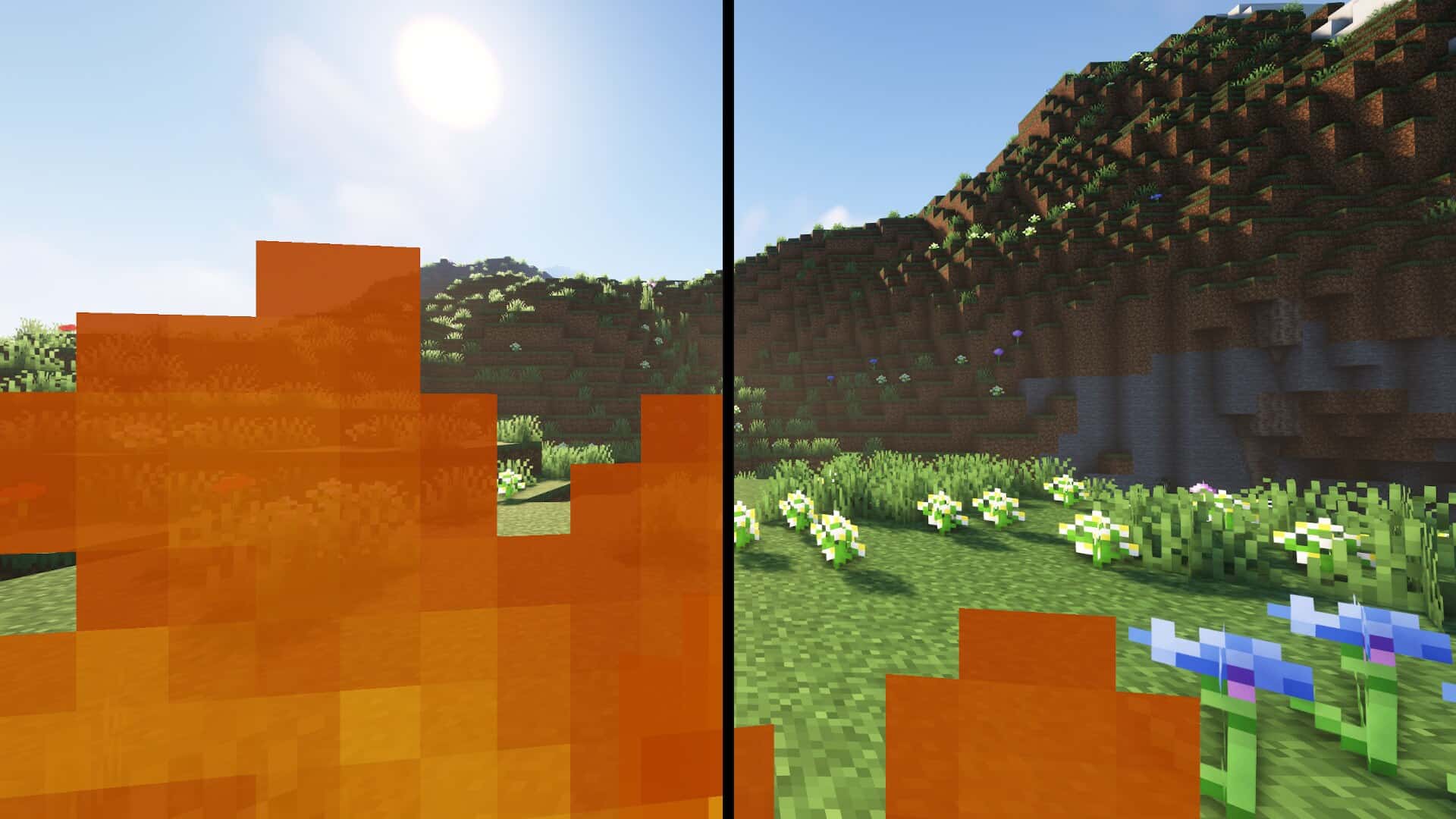
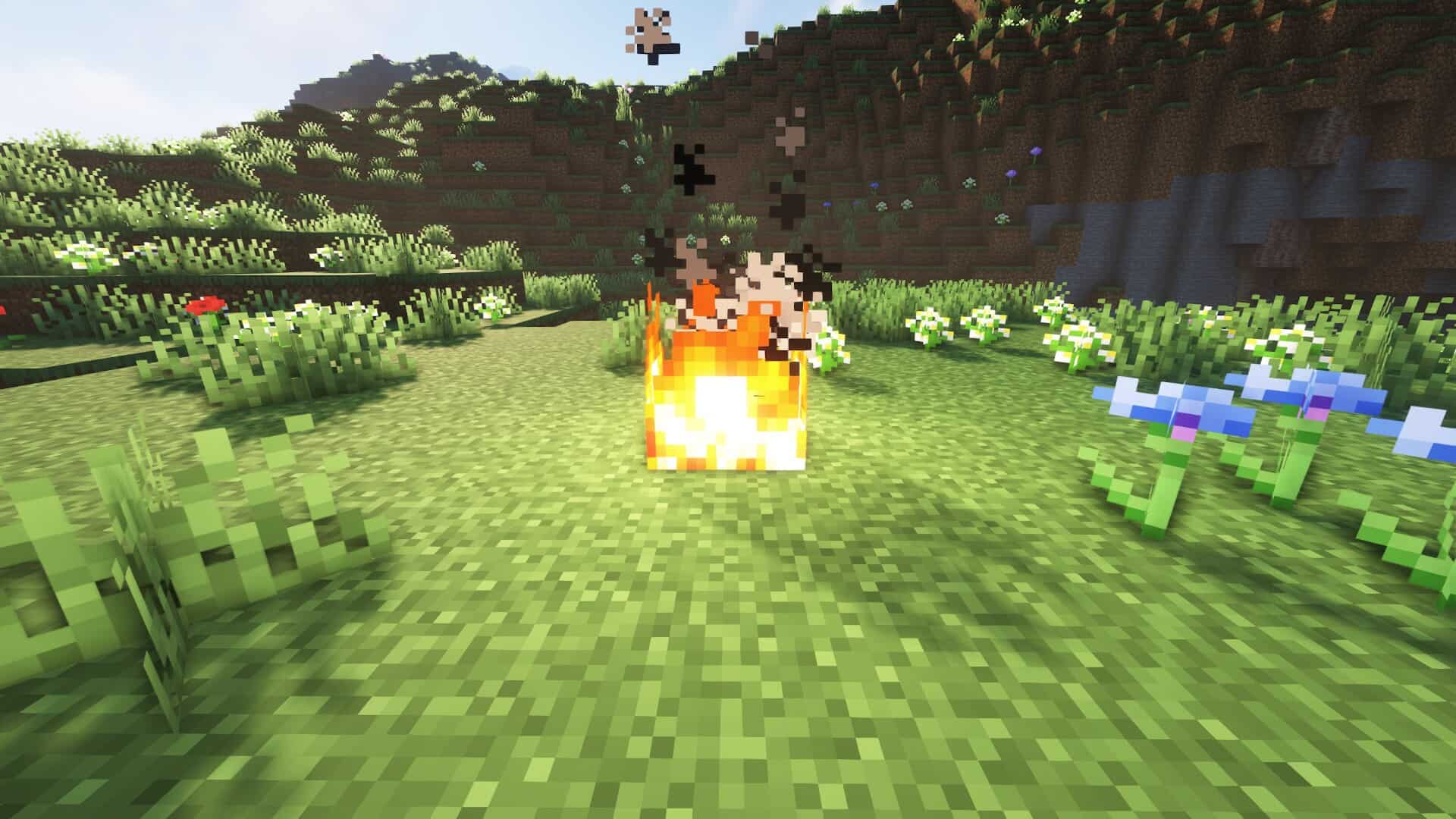
The Low on Fire resource pack by Haikis is one of those rare exceptions we are absolutely thrilled to share with you, because while we usually do not cover tiny packs — the ones that barely touch the game visuals — sometimes a small change can have such a massive effect on gameplay that it is definitely worth shouting about. The concept here might not be entirely new, but the execution is so clean, so practical, and so player-focused that it truly deserves your attention, especially if you love playing in PvP mode. In fact, we will explain in just a moment why this little texture pack can become a huge advantage when the stakes are high. If you have ever played Minecraft in its default, vanilla form, you know the problem already — the moment your character catches on fire, enormous flames flood your entire screen. Sure, they look dramatic, but they also make it nearly impossible to see what is happening around you. Now imagine what happens in a tense PvP battle, when you are trying to dodge attacks, plan your next move, or just want to run from the fight, and suddenly your vision is completely engulfed in flames. You lose sight of your opponent, cannot see your surroundings clearly, and often, that is the exact moment the fight is over. It is frustrating, it is disorienting, and it is precisely the issue that Low On Fire sets out to fix. So, what does this pack actually do? It wonderfully reduces both the size and opacity of the flames that appear on your screen when you are burning. You will still know you are on fire — the visual cue is definitely there — but it no longer dominates your entire field of vision. That means you can keep track of enemy movements, watch the environment, and react much faster without the constant struggle of looking through a wall of fire. And here is an important detail — flames on the ground or on blocks remain completely unchanged. This is not a full fire rework; it is a targeted improvement to the screen effect, keeping the look and feel of the world fully intact while making the player experience significantly smoother. Another reason we really appreciate Low On Fire is its fantastic accessibility and simplicity. Unlike many packs that require extra mods like OptiFine or Iris just to function properly, this one works entirely on its own.
You simply download the .zip file, drop it straight into your resource packs folder, enable it in the Minecraft menu, and you are completely done — no complicated setup, no technical barriers whatsoever. The pack supports versions all the way from the old 1.6.x builds up to the most recent 1.21.x release, so whether you are a veteran still running older editions or someone who always plays on the latest update, you can take advantage of its great benefits without ever worrying about compatibility headaches. And it is not just us who think this way — the Minecraft community has truly embraced this pack in a big way. With millions of downloads across both Modrinth and CurseForge, players consistently praise how amazingly it improves visibility in critical moments. In PvP, every single second counts, and every block placement or sword swing can change the final outcome. By effortlessly removing the visual clutter of oversized fire effects, this pack gives you a much cleaner view of the action, which can make all the difference between sweet victory and bitter defeat. But even if PvP is not really your thing, Low On Fire still has incredible value in PvE too. Survival mode becomes a lot less stressful when a sudden blaze or accidental lava encounter does not completely blind you, and exploration is far more comfortable when you can easily keep an eye on your surroundings no matter what dangerous hazards you face. Performance-wise, there is genuinely no downside. Because the pack only alters the fire overlay and leaves everything else untouched, it will not drop your FPS at all. In fact, on some very low-end systems, it might even give you a slight boost simply by being much lighter than the default animation. That makes it an exceptionally solid choice for players who want better visibility without sacrificing performance — a complete win-win situation. Of course, there is one important note to keep in mind that just like the X-Ray Ultimate resource pack, Low On Fire is not allowed in official speedruns and may be banned on certain strict multiplayer servers. That is because reduced visual obstruction can be seen as a competitive advantage, and fair play is always a top priority. Still, if you are free to use it in your chosen server or single-player world, it can easily be an absolute game changer in both PvP and PvE. In the end, Low On Fire is wonderful proof that even a small change can truly make a massive difference.
Low On Fire should be compatible with all of these Minecraft versions: 26.2 – 26.1.2 – 26.1.1 – 26.1 – 1.21.11 – 1.21.10 – 1.21.9 – 1.21.8 – 1.21.7 – 1.21.6 – 1.21.5 – 1.21.4 – 1.21.3 – 1.21.2 – 1.21.1 – 1.21 – 1.20.6 – 1.20.5 – 1.20.4 – 1.20.3 – 1.20.2 – 1.20.1 – 1.20 – 1.19.4 – 1.19.3 – 1.19.2 – 1.19.1 – 1.19 – 1.18.2 – 1.18.1 – 1.18 – 1.17.1 – 1.17 – 1.16.5 – 1.16.4 – 1.16.3 – 1.16.2 – 1.16.1 – 1.16 – 1.15.2 – 1.15.1 – 1.15 – 1.14.4 – 1.14.3 – 1.14.2 – 1.14 – 1.13.2 – 1.13.1 – 1.13 – 1.12.2 – 1.12 – 1.11.2 – 1.11 – 1.10.2 – 1.10 – 1.9.4 – 1.9 – 1.8.9 – 1.8.8 – 1.8.1 – 1.8.6 – 1.8 – 1.7.10 – 1.7.9 – 1.7.4 – 1.7 – 1.6.4 – 1.6.2 – Bedrock Edition – PE
Screenshots
How to Install Texture Pack (Simple 10 Steps)
- Download OptiFine: Most of the texture packs and shaders need OptiFine. That’s why, first download and install OptiFine for the version of Minecraft you want to play.
- Download the Texture Pack: Get the texture pack you want from the download section. Choose the version that works with your Minecraft and your PC’s performance.
- Open Minecraft Launcher: Start Minecraft using the official game launcher — or even TLauncher, if you use that.
- Go to Options: From the main menu, click on the “Options” button.
- Open Resource Packs: Inside Options, click on “Resource Packs…”.
- Open the Resource Pack Folder: Click on “Open Resource Pack Folder” — this will open a folder named “resourcepacks”.
- Move the Pack File: Copy or move the .zip file you downloaded into that “resourcepacks” folder. (Don’t unzip the file — Minecraft uses it as-is!)
- Go Back and Refresh: Close the folder and click “Done”, then go back into “Resource Packs…” again.
- Activate the Pack: You’ll see the pack on the left side. Hover over it and click the arrow to move it to the right (active side).
Tip: If you get a message that the pack is for a different version, just click “Yes” — it usually works fine. - Click Done and Enjoy: Click “Done” again. Now your pack is ready to use in-game. It’s that easy!
Credits
The Low On Fire resource pack was created by Haikis. We do not claim ownership of this content, and we do not modify the original files. All rights remain with the original creator. We strongly encourage you to support Haikis by downloading the pack through the official creator links provided below.
Download Links
Java Edition
- [16x] Minecraft 26.2.x – 1.21.x
- [16x] Minecraft 1.20.x
- [16x] Minecraft 1.19.x
- [16x] Minecraft 1.18.x
- [16x] Minecraft 1.17.x
- [16x] Minecraft 1.16.x – 1.15.x
- [16x] Minecraft 1.14.x – 1.13.x
- [16x] Minecraft 1.12.x – 1.11.x
- [16x] Minecraft 1.10.x – 1.9.x
- [16x] Minecraft 1.8.x – 1.6.x
Bedrock Edition
Download Instructions
Curseforge: download starts automatically after a few seconds;
Mediafire: click the big blue button with the text “DOWNLOAD”;
Google Drive: in the top right corner you will see a small download icon (down arrow), click it and the download should start;