Minecraft Texture Packs Minecraft Resource Packs

Introduction
Minecraft’s minimap mods are incredibly useful, but their default icons can sometimes feel flat or visually inconsistent with the rest of the game. Icon Xaero’s Texture Pack is designed to solve exactly that problem. Instead of changing blocks or items, this pack focuses on improving how icons appear inside popular minimap mods, making them clearer, cleaner, and easier to read during gameplay.
The result is a more polished navigation experience that feels better integrated with Minecraft’s vanilla style. Whether you are exploring new terrain, tracking mobs, or navigating large survival worlds, Icon Xaero’s enhances visibility without adding visual clutter or unnecessary complexity.
What Icon Xaero’s Texture Pack Is
Icon Xaero’s Texture Pack is a specialized resource pack created to replace and improve the icons used by Xaero’s minimap-related mods. Its core goal is simple: provide sharper, more readable, and more visually consistent icons that work seamlessly with the minimap and world map interfaces.
Unlike traditional texture packs that overhaul blocks or items, this pack targets UI elements only. It is specifically built to work alongside Xaero’s Minimap and Xaero’s World Map, meaning it does not function as a standalone visual pack. Instead, it acts as a lightweight visual upgrade that complements existing gameplay setups.
Icon Xaero’s Texture Pack is compatible with the following Minecraft versions: 1.16.x – 1.17.x – 1.18.x – 1.19.x – 1.20.x (and newer updates as they are supported).
The pack uses a clean, UI-focused resolution that matches the default Minecraft style, ensuring icons remain crisp at different UI scales. OptiFine is not required, and the pack works perfectly in standard modded environments where Xaero’s mods are installed.
Art Style, Visual Direction, and Gameplay Clarity
The visual direction of Icon Xaero’s Texture Pack can best be described as minimal, vanilla-friendly, and clarity-focused. Icons are redesigned with stronger silhouettes, balanced contrast, and consistent shapes, making them instantly recognizable even at smaller sizes on the minimap.
Colors are carefully chosen to remain readable without becoming overly bright or distracting. Hostile mobs, passive mobs, players, and points of interest are visually distinct, which helps reduce confusion during fast-paced gameplay or exploration-heavy sessions. This is especially noticeable when navigating dense areas such as caves, forests, or mob farms.
Another strength of this pack is its consistency. All icons follow the same design language, so nothing feels out of place. The result is a minimap UI that looks intentional and polished rather than patched together. While the changes may seem subtle at first glance, they make a significant difference over long play sessions by reducing eye strain and improving quick decision-making.
Because the pack focuses only on icons and UI elements, it has no impact on world visuals or performance. Gameplay remains unchanged, but navigation becomes smoother and more intuitive.
Perfect For Players Who
- Regularly use Xaero’s Minimap or Xaero’s World Map
- Prefer clean, readable UI elements over flashy visuals
- Explore large worlds and rely on minimap information
- Want small quality-of-life improvements without performance cost
- Play long survival or SMP sessions where clarity matters
Screenshots Section
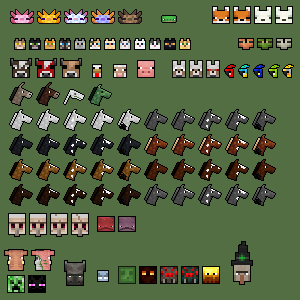
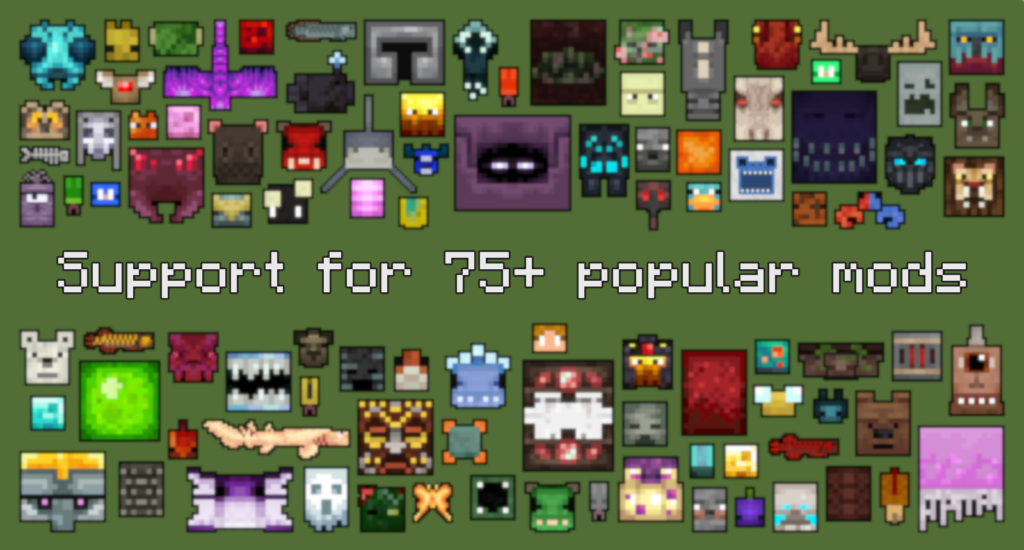
The screenshots provided for Icon Xaero’s Texture Pack are taken from official sources and show the pack running in-game with compatible minimap mods enabled. They highlight how the redesigned icons appear during normal gameplay, including exploration, mob tracking, and navigation. These images accurately represent the pack’s visual consistency and clarity without additional visual enhancements.
Download
You can download the texture pack using the official link below.
Creator: Original credit goes to the creator of Icon Xaero’s Texture Pack.
All rights and full credit belong to the original creator.
Disclaimer
We do not host texture pack files. We only provide links to official sources, and availability of external links may change over time.