Minecraft Texture Packs Minecraft Resource Packs

Exploring dark caves, deep oceans, or nighttime landscapes in Minecraft can be atmospheric, but it can also slow down gameplay when visibility becomes an issue. This is where the FullBright Texture Pack comes in. Designed to remove darkness from the game, this pack makes every environment fully visible without changing Minecraft’s core visuals. It offers a simple, practical solution for players who want clarity at all times, whether they are mining, building, or recording content.
Rather than reworking textures or adding visual effects, FullBright focuses on one goal: maximum visibility. The result is a clean and familiar Minecraft experience that feels identical to vanilla gameplay, just without shadows or dark areas getting in the way.
What FullBright Texture Pack Is
FullBright Texture Pack is a utility-focused resource pack that removes in-game darkness by making light levels appear fully bright at all times. It does not alter block textures, item designs, or UI elements. Instead, it modifies how lighting is displayed, ensuring that caves, nighttime areas, and enclosed spaces remain clear and easy to see.
Compared to night vision commands or potion effects, FullBright provides a constant and stable brightness level without particles, visual distortion, or timers. It is widely used by players who want convenience without affecting Minecraft’s default look.
FullBright Texture Pack is compatible with the following Minecraft versions:
1.8.x – 1.12.x – 1.16.x – 1.18.x – 1.19.x – 1.20.x (and newer updates, depending on pack version).
The pack uses a 16x resolution, matching Minecraft’s default texture scale. No additional mods are required. OptiFine is optional, not mandatory, making the pack easy to install on both vanilla and modded setups.
Art Style, Visual Direction, and Gameplay Clarity
From a visual standpoint, FullBright stays completely faithful to Minecraft’s vanilla art style. Blocks, items, mobs, and environments retain their original colors and textures. The only noticeable difference is the absence of darkness and shadows that would normally appear in low-light conditions.
Colors appear more consistent across biomes and structures since lighting no longer affects visibility. Ores inside caves are instantly recognizable, terrain details are always clear, and building interiors remain fully visible without additional light sources.
This approach significantly improves gameplay clarity. Block recognition becomes effortless, especially during mining sessions or large-scale building projects. UI elements remain untouched, ensuring consistency with the default interface. Because the pack avoids custom textures or visual enhancements, it feels lightweight and distraction-free.
FullBright is particularly popular among technical players and content creators who need reliable visibility for recording or showcasing builds without altering Minecraft’s natural appearance.
Perfect For Players Who
- Prefer a vanilla-looking Minecraft experience with improved visibility
- Spend a lot of time mining, caving, or exploring at night
- Want a lightweight utility pack with no performance impact
- Create videos or screenshots and need consistent lighting
- Play on lower-end systems and want clarity without shaders or mods
Screenshots
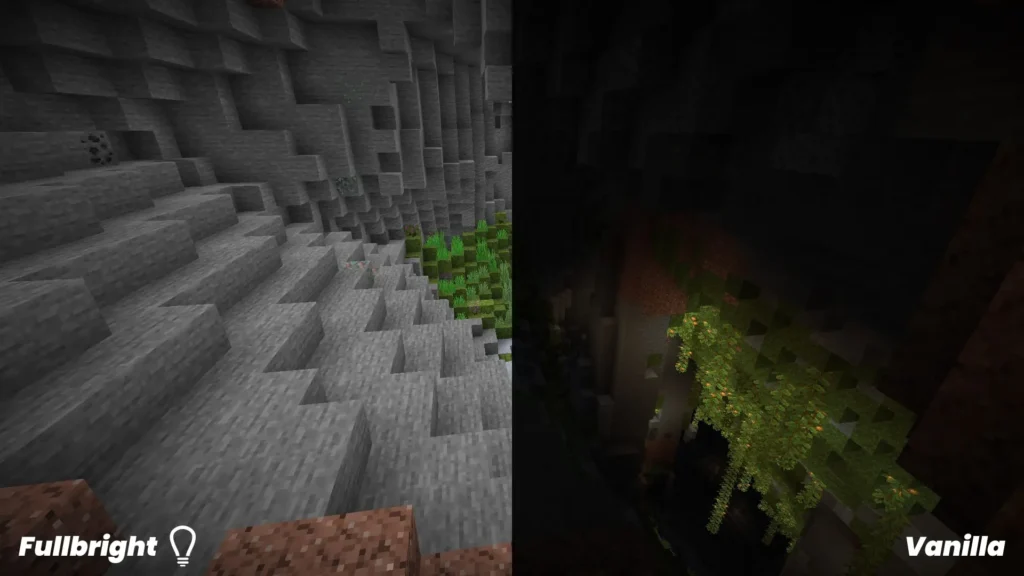
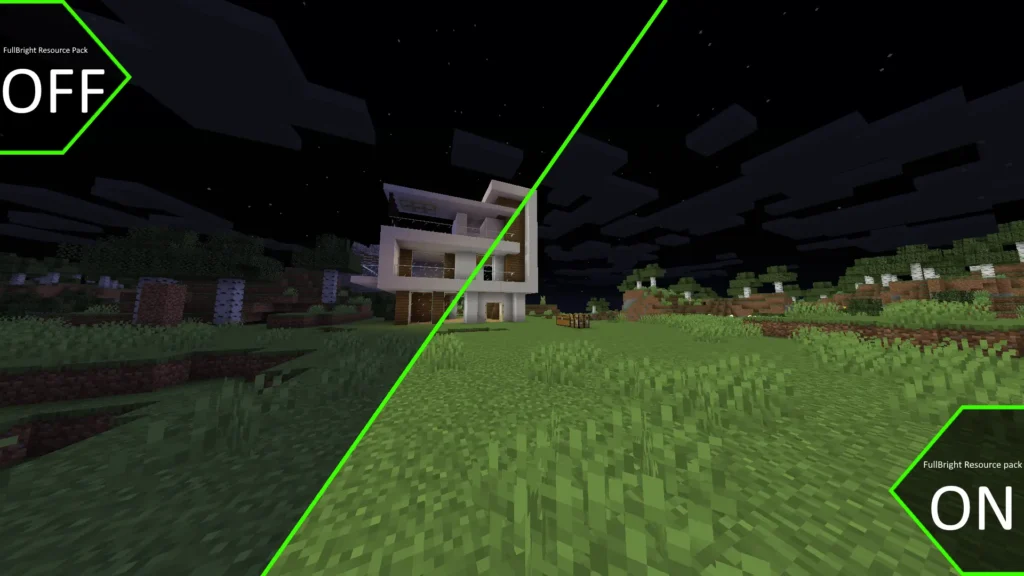
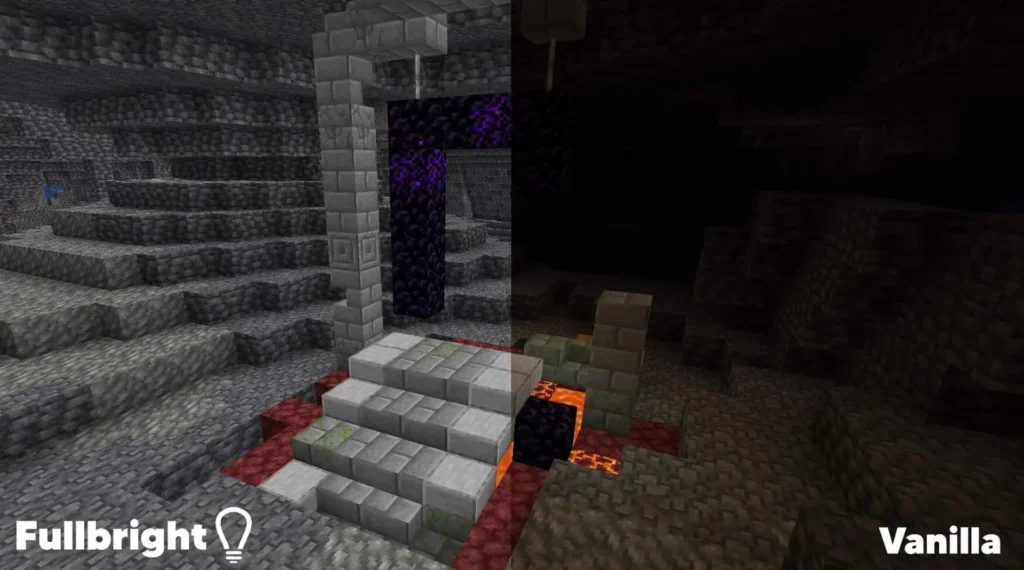
The screenshots above are taken from official sources and show the FullBright Texture Pack running in-game. They highlight how environments remain fully visible regardless of time of day or location, while preserving Minecraft’s original textures and visual consistency.
Download
You can download the texture pack using the official link below.
Java Edition:
[16x] [1.21.x] Download FullBright Resource Pack
[16x] [1.20.x] Download FullBright Resource Pack
[16x] [1.19.x] Download FullBright Resource Pack
[16x] [1.18.x] Download FullBright Resource Pack
[16x] [1.17.x] Download FullBright Resource Pack
[16x] [1.16.x – 1.13.x] Download FullBright Resource Pack
[16x] [1.12.x – 1.11.x] Download FullBright Resource Pack
[16x] [1.10.x – 1.9.x] Download FullBright Resource Pack – optifine required;
[16x] [1.8.x – 1.7.x] Download FullBright Resource Pack
Curseforge: download starts automatically after a few seconds;
Mediafire: click the big blue button with the text “DOWNLOAD”;
Google Drive: in the top right corner you will see a small download icon (down arrow), click it and the download should start;
Creator: FullBright Texture Pack contributors
All credit for this texture pack goes to the original creator(s).
Disclaimer
We do not host texture pack files. We only provide links to official sources, and availability of external links may change over time.