Minecraft Texture Packs Minecraft Resource Packs

Minecraft’s default visuals have a timeless charm, but many players want something a little more polished without losing that familiar vanilla feeling. Stay True is a texture pack built around that exact idea. It subtly refines Minecraft’s textures, improves consistency, and enhances colors while keeping everything instantly recognizable. Instead of completely redesigning the game, Stay True focuses on making Minecraft look cleaner, more detailed, and more cohesive during normal gameplay.
This pack is designed for players who enjoy the original art style but want a smoother, more modern look that feels natural in survival worlds, creative builds, and long-term playthroughs.
What Stay True Texture Pack Is
Stay True is a vanilla-friendly resource pack that reworks Minecraft’s textures with small but thoughtful improvements. Its core goal is to stay as close as possible to the original game while fixing visual inconsistencies and adding subtle detail where it makes sense. Blocks, items, and environments feel more refined, but never unfamiliar.
Compared to heavier overhaul packs, Stay True avoids drastic changes. It sits closer to vanilla than packs like Faithful or realistic texture packs, making it easy to switch to without adjusting your playstyle. The pack works well in both survival and creative modes and does not interfere with gameplay mechanics.
Stay True is compatible with the following Minecraft versions:
1.16.x – 1.17.x – 1.18.x – 1.19.x – 1.20.x (and newer updates as they are supported).
The texture pack is available primarily in 16x resolution, matching Minecraft’s default resolution for maximum performance and compatibility. Because of its lightweight design, it runs smoothly on most systems. OptiFine is optional but recommended, especially if you want better texture support, connected textures, or to pair the pack with shaders.
Art Style, Visual Direction, and Gameplay Clarity
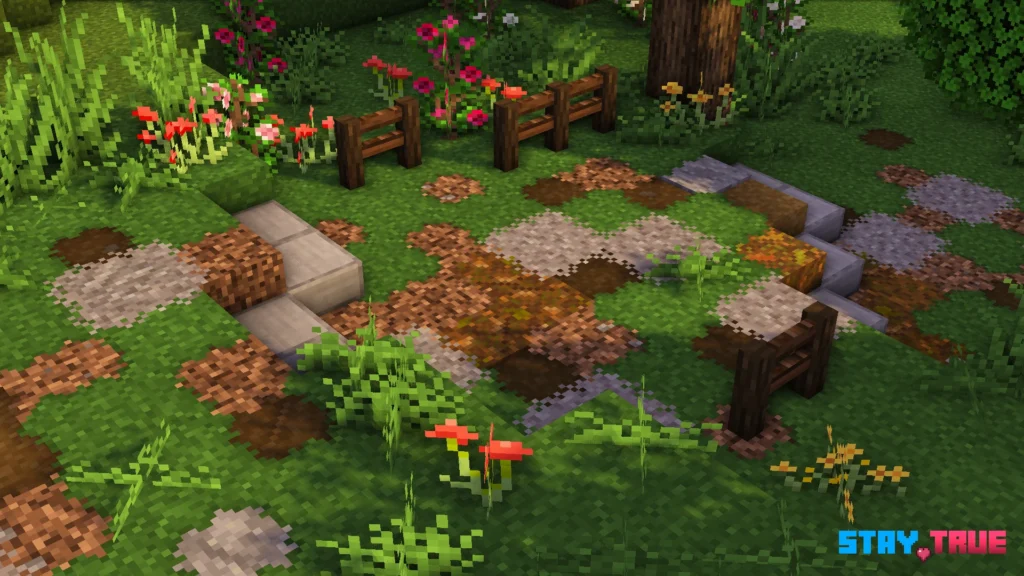
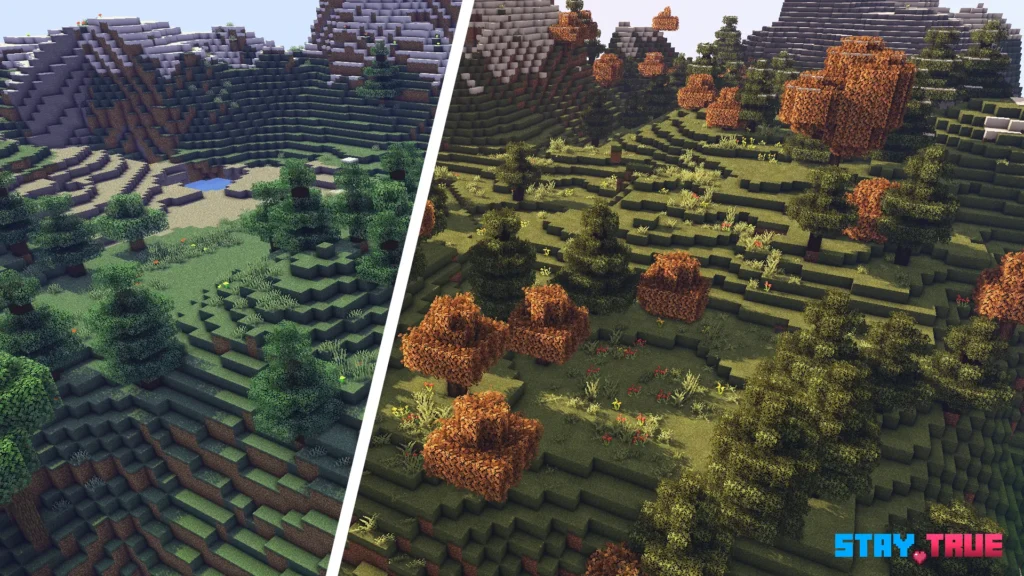
The art style of Stay True can best be described as clean vanilla-plus. Colors are slightly adjusted to feel more natural and consistent across biomes, while textures gain extra depth without becoming noisy or overly sharp. Grass, stone, wood, and common building blocks blend together more smoothly, giving worlds a balanced and cohesive look.
One of the biggest strengths of the pack is how it improves visual consistency. Blocks that previously felt mismatched now share a clearer design language. This makes large builds look more intentional and natural, especially when using mixed materials. Terrain generation also feels more pleasant to explore, with smoother transitions between different block types.
From a gameplay perspective, readability remains excellent. Ores are still easy to recognize, items remain clear in the inventory, and nothing feels confusing or distracting during normal play. The UI stays close to vanilla, ensuring menus and icons are familiar and easy to use.
Stay True works particularly well with shaders. Because the textures are not overly detailed, lighting and shadows from shaders can enhance the world without clashing with the pack’s style. Even without shaders, the improved contrast and cleaner textures make everyday gameplay feel more polished.
Perfect For Players Who
- Prefer a vanilla-friendly look with subtle visual upgrades
- Want better texture consistency without changing Minecraft’s identity
- Play long survival worlds and want visuals that age well over time
- Use low- to mid-range hardware and need a lightweight texture pack
- Enjoy pairing resource packs with shaders for a natural result
Screenshots
The screenshots below are taken from official sources and show Stay True running in-game. They highlight the pack’s clean textures, consistent color palette, and how naturally it blends with Minecraft’s default visuals across different environments and builds.
Download
You can download the texture pack using the official link below.
Java Edition:
[16x] [1.21.x] Download Stay True Resource Pack
[16x] [1.20.6 – 1.20.2] Download Stay True Resource Pack
[16x] [1.20.1 – 1.20] Download Stay True Resource Pack
[16x] [1.19.x] Download Stay True Resource Pack
[16x] [1.18.x] Download Stay True Resource Pack
[16x] [1.17.x] Download Stay True Resource Pack
[16x] [1.16.x] Download Stay True Resource Pack
[16x] [1.15.x] Download Stay True Resource Pack
[16x] [1.14.x] Download Stay True Resource Pack
Add-ons (Java Edition):
StayTrue NoBushyLeaves – removes the bushy leaves from Stay True resource pack;
Curseforge: download starts automatically after a few seconds;
Mediafire: click the big blue button with the text “DOWNLOAD”;
Google Drive: in the top right corner you will see a small download icon (down arrow), click it and the download should start;
Creator: Credit goes fully to the original creator of the Stay True texture pack. We do not modify or redistribute the files and always link to official sources only.
Disclaimer
We do not host texture pack files. We only provide links to official sources, and availability of external links may change over time.