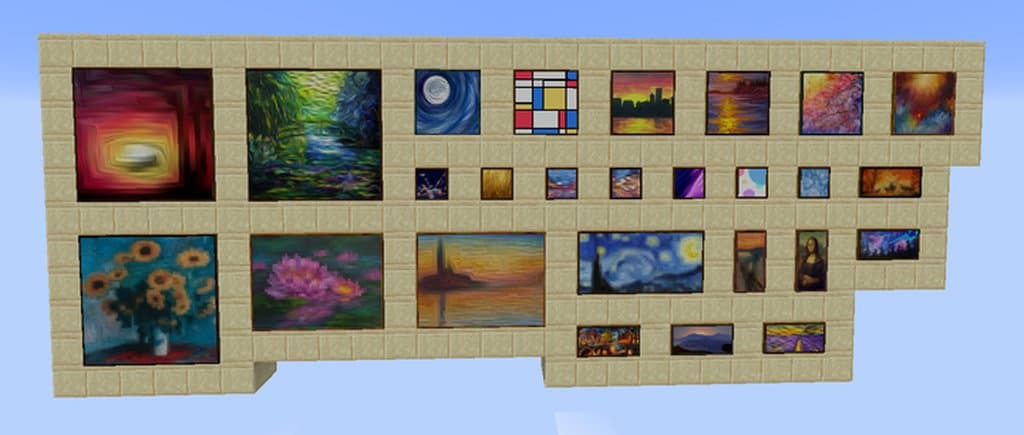
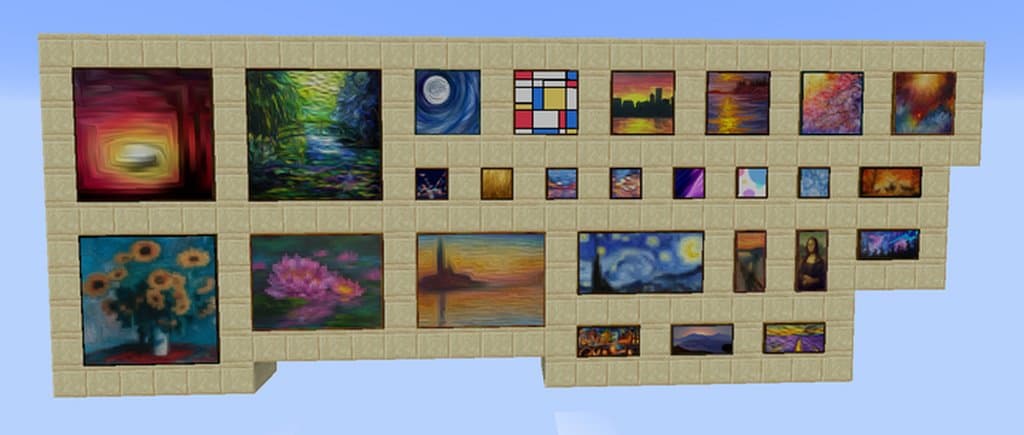
The Better Paintings resource pack has already gained great popularity among the Minecraft players, and honestly, you really need to check it out! Have you already heard about this texture pack? Well, Better Paintings isn’t similar to any traditional resource pack available for the Minecraft game; rather, it works in a completely different way. For example, most of the Minecraft resource packs are designed to change the overall game textures and visuals, but The Better Paintings resource pack isn’t aimed to remake the game textures. Instead, it mainly focuses on the paintings of your favorite Minecraft game. As you already know, the paintings of the game are particularly lackluster and boring, but no worries! You can now easily ensure intriguing and inspiring looks by using this resource pack. This wonderful pack will replace almost all the default paintings of Minecraft with the better ones, which are much better than the Minecraft default paintings as they are quite detailed and they create an appealing look in the game.
In addition to the above benefits, The Better Paintings resource pack has also introduced a bunch of renowned paintings, such as The Starry Night by Van Gogh paintings and Mona Lisa by Leonardo Da Vinci, which are an absolute joy to decorate with. These newly added paintings of The Better Paintings can be an add-on treat for the Minecraft players. There are two more excellent benefits about these paintings that this pack has brought for you. First of all, these paintings come in multiple different dimensions, allowing you to ensure that your choices and preferences are met. Secondly, the pack also features a special painting that is designed in the combination of two separate paintings, which is particularly useful for long walls. As mentioned already, The Better Paintings resource pack just aims to change the paintings of your favorite Minecraft game, and thankfully, it doesn’t cause any performance issues at all. Even if you have a low-end PC, please feel free to install and use this resource pack without worrying about a slow and bogging down game performance.
Better Paintings should be compatible with all of these Minecraft versions: 1.15.2 – 1.15.1 – 1.15 – 1.14.4 – 1.14.3 – 1.14.2 – 1.14
Screenshots
How to Install Texture Pack (Simple 10 Steps)
- Download OptiFine: Most of the texture packs and shaders need OptiFine. That’s why, first download and install OptiFine for the version of Minecraft you want to play.
- Download the Texture Pack: Get the texture pack you want from the download section. Choose the version that works with your Minecraft and your PC’s performance.
- Open Minecraft Launcher: Start Minecraft using the official game launcher — or even TLauncher, if you use that.
- Go to Options: From the main menu, click on the “Options” button.
- Open Resource Packs: Inside Options, click on “Resource Packs…”.
- Open the Resource Pack Folder: Click on “Open Resource Pack Folder” — this will open a folder named “resourcepacks”.
- Move the Pack File: Copy or move the .zip file you downloaded into that “resourcepacks” folder. (Don’t unzip the file — Minecraft uses it as-is!)
- Go Back and Refresh: Close the folder and click “Done”, then go back into “Resource Packs…” again.
- Activate the Pack: You’ll see the pack on the left side. Hover over it and click the arrow to move it to the right (active side).
Tip: If you get a message that the pack is for a different version, just click “Yes” — it usually works fine. - Click Done and Enjoy: Click “Done” again. Now your pack is ready to use in-game. It’s that easy!
Credits
Credits to smythe71 for the creation of this resource pack. We do not own or modify this resource pack. We strongly encourage supporting the creator by visiting their official download links.
Download Links
Java Edition
Download Instructions
Curseforge: download starts automatically after a few seconds;
Mediafire: click the big blue button with the text “DOWNLOAD”;
Google Drive: in the top right corner you will see a small download icon (down arrow), click it and the download should start;